ProRes vs BRAW: Two Workflows That Behave Very Differently
Short answer
ProRes stores a debayered, colour-processed image and plays anywhere, which suits delivery and fast turnaround. BRAW stores compressed sensor data, so white balance and ISO stay editable, at roughly half the storage of comparable ProRes. BRAW is recorded internally on Blackmagic bodies while ProRes usually needs an external recorder on a mirrorless camera.
These two get compared as codecs and the real difference is what they store. ProRes is a finished image, efficiently compressed. BRAW is sensor data with the colour decisions still open. That difference shows up in flexibility, in storage, and in whether you need a Atomos Ninja 5.2-inch bolted to your rig at all, since a Blackmagic Pocket Cinema Camera 6K G2 writes BRAW internally.
What each format stores
ProRes stores a debayered, colour-processed image. The sensor data has already been interpreted, white balance has been applied, and a picture profile is baked in. It is an intraframe codec, so every frame is complete and scrubs instantly, and it grades well because the bit depth is generous. What it does not do is let you change decisions that were made in camera.
BRAW stores compressed sensor data with metadata describing the intended interpretation. White balance and ISO are metadata rather than pixel values, so both are adjustable afterwards with no penalty. That is a genuinely different capability rather than a better version of the same thing.
The word RAW is doing some work in that description. BRAW performs part of the demosaic on the camera before compression, which is what makes it far more efficient than a truly uncompressed RAW and far easier on an editing machine. Purists note this; in practice the flexibility that matters is retained.
The comparison
| ProRes 422 HQ | BRAW 5:1 | |
|---|---|---|
| What it stores | Debayered, processed image | Compressed sensor data plus metadata |
| White balance | Baked in | Editable afterwards |
| ISO | Baked in | Editable afterwards |
| 4K bitrate | About 880 Mbps | About 300 Mbps at 4K |
| Storage per hour | About 396 GB | About 135 GB at 4K |
| Plays anywhere | Yes, on any machine | Needs Blackmagic support or a plugin |
| How you record it | Usually an external recorder | Internally on Blackmagic bodies |
| Edit machine demand | Low, it is a finished image | Moderate, it decodes on playback |
The storage row surprises people who assume RAW is always larger. BRAW at a moderate compression ratio is genuinely smaller than ProRes 422 HQ at the same resolution, because it stores one sensor value per photosite rather than three colour channels per pixel. It is one of the strongest practical arguments for the format.
The rig implications
BRAW is recorded internally, which means no external recorder, no extra 10 to 20 W of power draw, no additional HDMI cable to clamp and snag, and no second set of files to sync. On a rig where every accessory is a compromise, removing a whole device is a substantial simplification.
ProRes on a mirrorless body usually means an external recorder like the Atomos Ninja 5.2-inch at around $589 or the Atomos Ninja RAW at $699. That is a purchase, a power plan and a mounting problem, and it is exactly the sort of thing that pushes a rig into needing V-mount power.
Some cameras record ProRes internally, which removes that argument entirely. If yours does, ProRes becomes a straightforward choice with no rigging cost, and the decision reduces to whether you want editable white balance.
The two routes, and what they both need
A body that writes BRAW internally, a recorder that writes ProRes externally, and the drive either workflow fills.

Blackmagic Design
Blackmagic Pocket Cinema Camera 6K G2
Super 35 with an EF mount and internal BRAW, at the cost of weak autofocus and a real power budget.
- Mount
- EF
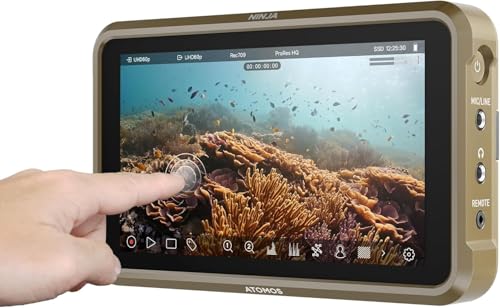
Atomos
Atomos Ninja 5.2-inch
Monitor and ProRes recorder in one, which sidesteps a camera's internal codec limits and gives an edit-friendly file straight off the card.
- Size
- 5.2 in
- Codec
- ProRes
The pick when the body records only long-GOP internally.
Check price
Samsung
Samsung T9 1TB Portable SSD
The same 2000 MB/s class in a smaller shell that holds speed better under a long sustained copy.
- Capacity
- 1 TB
The value pick for daily offloads.
Check priceWhich one suits which job
Fast turnaround, client deliverables, multi-camera events: ProRes. It plays on any machine without a plugin, an editor can open it immediately, and the image is already interpreted so nobody has to make colour decisions before a rough cut exists.
Narrative, commercial and anything with a real grade: BRAW. The ability to change white balance after the fact is not a safety net, it is a creative tool, and the storage efficiency means the shoot generates less material to manage than the ProRes equivalent.
Delivering to a facility or a broadcaster: check the spec sheet. Many require ProRes deliverables specifically, and while you can export ProRes from a BRAW timeline, some workflows want camera originals in a supported format.
The cost of each, over a project
| Item | ProRes route | BRAW route |
|---|---|---|
| Camera | Any body with clean HDMI output | A Blackmagic body |
| Recorder | $589 to $985 | None |
| Extra power draw | 10 to 20 W continuously | None |
| Media, 10 hours at 4K | About 4 TB | About 1.4 TB |
| Extra cables | One HDMI or SDI run | One USB-C to the drive, if used |
| Editing compatibility | Universal | Excellent in Resolve, plugin elsewhere |
The media row over a real project is where the difference compounds. Ten hours of footage at 4K is roughly 4 TB in ProRes 422 HQ and about 1.4 TB in BRAW, and both have to be stored twice for the backup discipline to hold. That is a real difference in drives, offload time and archive cost.
The verdict
If you already own a Blackmagic body, shoot BRAW. It is the whole reason those cameras exist, it needs no additional hardware, and it produces smaller files than the ProRes equivalent while giving you more flexibility.
If you own a mirrorless body with a good internal 10-bit all-intra codec, think carefully before adding a recorder at all. The gap between a modern 10-bit 4:2:2 internal file and ProRes is narrower than the marketing suggests, and the money may be better spent on lighting.
If you shoot for clients who need fast turnaround and universal compatibility, ProRes is the safer answer regardless of the technical argument, because a file that opens everywhere on a deadline is worth more than a file with more latitude.
Next, from here
- Codecs explained
Long-GOP, all-intra, bit depth and subsampling.
- Internal versus external recording
Whether you need the recorder at all.
- Storage per hour calculator
Your own codec against your own day.
- Best monitor recorders
The ProRes route, in hardware.
- Best cinema cameras
Which bodies write which formats.
- Codec bitrate chart
Every common codec in one table.
Common questions
- Is BRAW actually RAW?
- Partially. BRAW performs some of the demosaic in the camera before compressing, which is why it is far more efficient than truly uncompressed RAW and far easier on an editing machine. What it retains is the part that matters practically: white balance and ISO stay as editable metadata rather than baked-in pixel values, which is the real flexibility of a RAW workflow.
- Which uses more storage, ProRes or BRAW?
- ProRes, usually, which surprises people. BRAW 5:1 at 4K is around 135 GB per hour while ProRes 422 HQ at 4K is around 396 GB per hour, because BRAW stores one sensor value per photosite rather than three colour channels per pixel. Over a ten hour project that is roughly 1.4 TB against 4 TB, doubled again for backups.
- Do I need an external recorder for BRAW?
- No, if you have a Blackmagic body, because BRAW is recorded internally to a card or an external SSD over USB-C. That removes a device, 10 to 20 W of continuous power draw, an extra cable to clamp, and a second set of files to sync. ProRes on a mirrorless body usually does require an external recorder.
- Can I edit BRAW in any software?
- It is native in DaVinci Resolve and available in other applications through a plugin, which is generally straightforward but is an extra step. ProRes opens everywhere with no plugin, which matters on a deadline and when handing files to an editor you do not control. That compatibility is a real advantage rather than a technicality.
- Which should I choose for client work?
- ProRes if turnaround is fast and compatibility matters, because a file that opens immediately on any machine is worth more than extra latitude nobody will use. BRAW if the project involves a real grade, since editable white balance is a creative tool rather than a safety net, and the storage efficiency means less material to manage.
- Is a recorder worth it if my camera has a good internal codec?
- Often not. The gap between a modern 10-bit 4:2:2 all-intra internal file and ProRes is narrower than the marketing implies, and the recorder brings a purchase, a power plan, a mounting problem and a second set of files. If your internal codec is genuinely limiting the edit or a client requires ProRes delivery, then it earns its place.
Totalling your own rig weight against your gimbal payload? The Camera Rig Build Planner is the paid version of these pages: 8 printable worksheets you fill in with your own numbers, plus the full PDF, $29.