Best Monitor Recorders for Video in 2026
Short answer
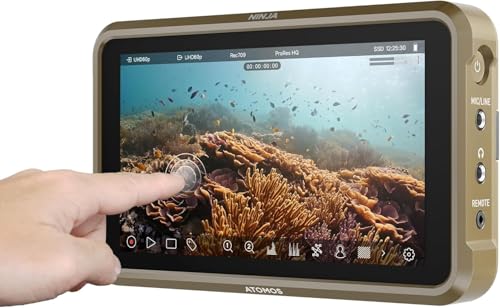
The best monitor recorder for most rigs is the Atomos Ninja at around $589, because it records edit-ready ProRes off the HDMI output of almost any mirrorless body, which sidesteps a camera that only offers long-GOP internally. If you grade seriously and your camera supports it, the Atomos Ninja RAW at $699 adds ProRes RAW and camera control for a hundred dollars more.
A monitor recorder solves a problem most people misdiagnose: not that the camera image is bad, but that the file the camera writes is hard to edit and hard to grade. The Atomos Ninja 5.2-inch at around $589 is the pick for most rigs, because it is a bright monitor and a ProRes recorder at once. If your body supports RAW over HDMI, the Atomos Ninja RAW at $699 goes further and adds camera control, and on a set with an SDI camera the Blackmagic Video Assist 7-inch 12G is the answer instead.
What an external recorder actually buys you
Three things, and only three. A better codec, because ProRes and ProRes RAW are intraframe formats that scrub instantly and grade without falling apart, while most in-camera codecs are long-GOP and have to reconstruct frames from neighbours. A bigger, brighter screen, since the recorder is also a monitor. And on some bodies, a longer or unlimited recording time, because the internal limits often exist for reasons that do not apply to an external file.
What it does not buy you is a better image. The sensor, the lens and the processing pipeline are unchanged. An external recorder captures what the camera sends out of its HDMI or SDI port, and if the camera sends an 8-bit 4:2:0 signal, that is what you will record. Check what your specific body outputs before you buy, because this is the single most common disappointment in the category.
The honest version: for a lot of modern cameras with good 10-bit internal codecs, an external recorder is a solution to a problem the camera already fixed. It is genuinely transformative on older bodies, on bodies with weak internal codecs, and on any workflow where the edit has to start the same day.
The three that matter
$589 to $985. One for HDMI mirrorless bodies, one for RAW capture and camera control, one for SDI on a narrative set.
Atomos
Atomos Ninja 5.2-inch
Monitor and ProRes recorder in one, which sidesteps a camera's internal codec limits and gives an edit-friendly file straight off the card.
- Size
- 5.2 in
- Codec
- ProRes
The pick when the body records only long-GOP internally.
Check price
Atomos
Atomos Ninja RAW
Adds ProRes RAW capture and camera control over HDMI, which is how a mirrorless body gets a genuinely gradeable file rather than a compressed one.
- Codec
- ProRes RAW
Only worth it if you grade seriously.
Check price
Blackmagic Design
Blackmagic Video Assist 7-inch 12G
12G-SDI and HDMI in, scopes on screen, and recording to fast SD or an external drive, which is the monitor a narrative set runs on because it speaks SDI.
- Inputs
- 12G-SDI + HDMI
- Size
- 7 in
Heavy and power hungry for a gimbal build.
Check priceProRes, ProRes RAW and BRAW, in plain terms
ProRes is a compressed intraframe codec. Every frame is stored complete, so the editor never has to reconstruct one from its neighbours, which is why ProRes scrubs instantly on hardware that chokes on high-bitrate long-GOP. It is a debayered, colour-processed image with a picture profile already applied, so it grades well but not infinitely.
ProRes RAW and BRAW are different animals. They store the sensor data before debayering, which means white balance and ISO become decisions you make in the edit rather than decisions you locked on set. The trade is file size, a more demanding pipeline, and the fact that you can no longer hand somebody a file that just plays.
BRAW is Blackmagic's format and is recorded internally on their bodies, which is why a Blackmagic Pocket Cinema Camera 6K G2 needs no external recorder to get a RAW workflow. That is a real cost advantage worth counting when comparing bodies: an FX3 plus a Ninja RAW is a very different number from a Pocket 6K that already writes BRAW to a cheap SSD. The ProRes and BRAW comparison goes through the working differences in detail.
The hidden costs of an external recorder
| Cost | What it actually means | How to plan for it |
|---|---|---|
| Power | A recorder draws far more than a monitor, often 10 to 20 W | Run it from a V-mount D-Tap, not from NP-F cells |
| Weight | Recorder plus its cage mount plus a cable, high on the rig | Check the gimbal payload before committing |
| Media | ProRes fills drives several times faster than a camera codec | Get the number from the storage calculator first |
| Cable | One more HDMI or SDI run to snag or unseat | Clamp the cable at the cage, always |
| Heat | Recorders get hot and some throttle in sun | Leave airflow, do not bury it under a hood |
| Workflow | A second set of files to offload, sync and archive | Use timecode so sync is automatic, not manual |
Storage is the one that surprises people. ProRes 422 HQ at 4K DCI 24p runs at roughly 880 Mbps, which is about 396 GB per hour. That is a 1 TB drive in two and a half hours. Run your own number on the media storage calculator with your actual codec before you decide, because the running cost of an external recorder outlives the purchase price.
Media for recorders is not media for cameras
Recorders write to fast SSDs or to specific card formats, not to the CFexpress card in your camera. That is usually good news, because SSD storage costs a fraction of what CFexpress costs per terabyte, and the drive that recorded the take can be plugged straight into an editing machine.
The Samsung T9 1TB Portable SSD and the SanDisk Extreme PRO 1TB Portable SSD are the sensible working sizes, and both sustain enough write speed for ProRes at 4K. Buy two rather than one big one: two drives means the day is split across two objects, and a failure loses half a day rather than all of it.
Do not buy the cheapest unbranded drive for this. Sustained write speed, not burst speed, is what a recorder needs, and cheap drives frequently advertise a burst figure they cannot hold for more than a few seconds before the cache fills and the write rate collapses. A dropped frame in a recorded take is not recoverable.
Drives that keep up
$210 to $406. Sustained write speed matters here, not the headline burst number on the box.

Samsung
Samsung T9 1TB Portable SSD
The same 2000 MB/s class in a smaller shell that holds speed better under a long sustained copy.
- Capacity
- 1 TB
The value pick for daily offloads.
Check price
Sandisk
SanDisk Extreme PRO 1TB Portable SSD
Up to 2000 MB/s over USB 3.2 Gen 2x2 with an IP65 rating, which is the practical floor for a drive that gets thrown in a bag.
- Capacity
- 1 TB
- Speed
- Up to 2000 MB/s
The first offload drive to buy.
Check price Samsung
Samsung T9 2TB Portable SSD
2 TB covers a RAW shoot day twice over, which is what a two-copy backup rule actually requires.
- Capacity
- 2 TB
Buy two and keep them apart.
Check priceSDI, HDMI and why the narrative answer is different
The Blackmagic Video Assist 7-inch 12G takes 12G-SDI as well as HDMI, and on a narrative set that is the deciding feature. SDI locks with a quarter turn, runs long distances over coax, and does not renegotiate the connection every time somebody nudges the cable. HDMI does renegotiate, and a momentary disconnect on an HDMI run stops a recording.
It also has scopes on the screen and records to fast SD cards or an external drive, which means the same box serves as the camera monitor, the recorder and the exposure reference. On a set where the camera is on sticks and weight is irrelevant, that consolidation is worth more than the size penalty costs.
On a run and gun rig the same box is a bad idea. Seven inches and its power draw on a handheld or gimbal build is a real handling cost for a screen you are barely looking at.
When to skip the recorder entirely
If your camera records 10-bit 4:2:2 internally in an all-intra codec, you already have most of what a recorder provides, and the money is better spent on a monitor plus glass. Bodies like the Panasonic Lumix GH7, the Panasonic Lumix S5IIX and the Canon EOS R5 C all write genuinely good internal files, and adding a recorder to them buys a bigger screen and a marginal codec upgrade for several hundred dollars.
If your camera writes BRAW internally, skip it entirely. That is the whole point of a Blackmagic body, and a Blackmagic Pocket Cinema Camera 6K Pro with a cheap SSD is already doing what a Ninja RAW does on a Sony.
And if you have not yet solved exposure judgement, buy a FEELWORLD F5 Prox 5.5-inch instead. It costs a quarter as much and prevents a much more common failure. A better codec makes good footage easier to grade; it does nothing for footage that was two stops under when it was shot.
How we chose
These picks come from published codec support, recording specifications, stated power requirements, input compatibility and verified owner reviews. We did not have every one of these in our hands and will not claim otherwise.
The criteria in order: which codecs it writes, what the camera can actually output to it, how it takes power, what media it needs and what that media costs to run. Screen quality mattered but came after all of those, because a recorder that runs out of power or drops frames is not a monitor problem.
Next, from here
- Best on-camera monitors
The cheaper purchase that prevents a more common failure.
- Internal versus external recording
The full head to head, including cost of running.
- ProRes versus BRAW
Two RAW-adjacent workflows that behave very differently.
- Storage per hour calculator
What ProRes actually costs you in drives.
- Codecs explained
Intraframe, long-GOP, bit depth and chroma subsampling.
- Best SSDs for video
Sustained write speed, and what a cheap drive really does.
Common questions
- Does an external recorder improve image quality?
- It improves the file, not the image. The sensor, lens and processing are unchanged, so what you record is exactly what the camera sends out of its HDMI or SDI port. What changes is the codec: ProRes and ProRes RAW are intraframe formats that scrub and grade far better than the long-GOP files most cameras write internally. If your camera outputs an 8-bit signal, an expensive recorder will faithfully record an 8-bit signal.
- How much storage does ProRes recording use?
- ProRes 422 HQ at 4K DCI 24p runs at roughly 880 Mbps, which is about 396 GB per hour, so a 1 TB drive holds around two and a half hours. ProRes RAW varies with the sensor and frame rate but is generally higher. Compare that with a 240 Mbps camera codec at 108 GB per hour and the running cost becomes the real expense of an external recorder rather than the purchase price.
- Should I buy a recorder or a monitor?
- Buy the monitor first unless your camera codec is genuinely limiting you. A $170 monitor with false colour prevents unrecoverable exposure mistakes, which is a more common failure than a difficult grade. Move to a recorder when the edit is fighting your files, when a client requires ProRes delivery, or when your camera cannot record internally what you need.
- Do I need an external recorder with a Blackmagic camera?
- No. Blackmagic Pocket bodies write BRAW internally to a cheap SSD or CFast card, which is the same class of workflow that a Ninja RAW provides on a Sony body. That internal capability is a real cost advantage when comparing bodies, because an FX3 plus a RAW recorder is a very different total than a Pocket 6K that already does it.
- What drive should I use with a monitor recorder?
- A branded portable SSD with a known sustained write rate, in a 1 TB or 2 TB size, and buy two rather than one large one so a failure costs half a day rather than all of it. Sustained write, not burst speed, is what matters: cheap drives often quote a burst figure they hold for a few seconds before the cache fills and the write rate collapses, and a dropped frame in a take is not recoverable.
- Can a recorder extend my camera recording time limit?
- Often yes, because the external file is written by the recorder rather than by the camera, so camera file size limits and some recording caps do not apply. Overheating limits still do, since those are about the sensor and internal electronics rather than the file. Check your specific body: some cameras also stop the HDMI output when internal recording stops, which defeats the purpose.
Totalling your own rig weight against your gimbal payload? The Camera Rig Build Planner is the paid version of these pages: 8 printable worksheets you fill in with your own numbers, plus the full PDF, $29.