Best On-Camera Monitors for Video in 2026
Short answer
The best on-camera monitor for most rigs is the FEELWORLD F5 Prox at around $170, because 1600 nits is the point where a screen stays readable in open shade and it loads 3D LUTs so a log picture can be judged properly. If you shoot mostly indoors, the Osee T5+ at $110 gives you the same false colour tool for sixty dollars less.
A field monitor is the cheapest way to stop producing footage you cannot use. The pick for most rigs is the FEELWORLD F5 Prox 5.5-inch at around $170, because it is bright enough to judge outdoors and it loads a 3D LUT so a flat log image can be viewed as it will eventually be graded. If your work is indoors, the Osee T5+ 5.5-inch Monitor at $110 gives you the same false colour readout for less, and false colour is the feature that actually prevents the damage.
What a monitor is actually for
Not framing. The camera screen frames perfectly well. A field monitor exists to give you three tools that no camera rear screen gives you honestly: false colour, a waveform, and a picture bright enough to see in daylight. Two of those are exposure tools, and exposure is the only mistake in this entire hobby that cannot be fixed later.
Log footage is the reason. A log picture profile records a flat, washed out image so the grade has room to move, which means the picture on your screen looks nothing like the finished shot. Judging it by eye is guesswork, and the guess is almost always toward underexposure, because a flat image reads as brighter than it is. False colour removes the guess by painting each brightness range a fixed colour, so skin at the correct level is always the same shade of pink no matter what the scene looks like.
That is the whole argument. A sharper lens improves a shot you already got. A monitor stops you from getting a shot you cannot use.
Brightness, and the number that matters
Monitor brightness is quoted in nits, and the useful thresholds are narrow. Around 400 to 500 nits is a typical camera rear screen and is unusable outdoors. Around 1000 nits, like the Osee T5+ 5.5-inch Monitor, works in shade and in interiors and becomes a mirror in open sun. From 1600 nits up, like the FEELWORLD F5 Prox 5.5-inch, you can work in open shade without a hood and in sun with one. At 2000 nits and above, like the NEEWER F700 7-inch Field Monitor, the panel is readable almost anywhere but is drawing real power to do it.
The trade nobody mentions is battery life. A panel run at full brightness draws roughly twice what the same panel draws at half, and the quoted runtime on the box is never measured at full output. If you buy 2000 nits and run it at 2000 nits, budget for double the cells. Work your own numbers on the battery runtime calculator rather than trusting the box.
A sunshade hood is the cheapest brightness upgrade there is. A Foldable Monitor Sunshade Hood, 5 inch at around $23 buys back more usable contrast in sun than the difference between a 1000 nit and a 1600 nit panel, because it is removing the light hitting the screen rather than trying to out-shout it. Buy the hood first, then decide whether you still need the brighter panel.
On-camera picks, 5 to 6 inch
$110 to $200. This size sits on the camera without changing how the rig balances, which is why it is the default for handheld and gimbal work.

osee
Osee T5+ 5.5-inch Monitor
1000 nits with customisable false colour at the price of a cheap loupe, which is the cheapest honest way to stop guessing exposure on a log picture profile.
- Size
- 5.5 in
- Brightness
- 1000 nits
Bright enough for shade, not for open sun.
Check price
FEELWORLD
FEELWORLD F5 Prox 5.5-inch
1600 nits and 3D LUT loading in a 5.5-inch body, which is the point where a monitor stays usable outdoors without a hood.
- Brightness
- 1600 nits
- LUTs
- 3D LUT
The value pick for run and gun.
Check price
FEELWORLD
FEELWORLD P6XL 6-inch
1200 nits with an internal battery, so the monitor does not add another NP-F to the rig or another cable to snag.
- Size
- 6 in
- Power
- Internal battery
Good for gimbal work where cable runs are the enemy.
Check priceFive inch or seven inch, and why size is a rigging decision
A 5 to 5.5 inch monitor is an operator tool. It mounts on the cage next to the handle, adds a couple of hundred grams and does not move the centre of gravity enough to matter. A 7 inch monitor is a director tool. It is heavier, it draws more power, it sits further from the camera on an arm, and on a gimbal it is a payload and balance problem rather than a convenience.
The mistake is buying seven inches for yourself. On a run and gun rig the extra screen area buys nothing you can use, since you are looking at false colour and focus peaking rather than admiring the image, and it costs you handling. The NEEWER F700 7-inch Field Monitor at 7 inches and 2000 nits is genuinely excellent, and it belongs on a stand next to a client, not on top of your camera.
On a narrative set the calculation inverts. The director and the DP need to see the frame, the monitor is on a stand or a magic arm rather than on the camera, and weight stops mattering the moment the camera is on sticks. That is where a large bright panel earns every dollar.
Director and video village picks, 7 inch
$200 to $280. Bigger, brighter, and two of them speak SDI, which is what you need once cable runs get long or the camera has BNC outputs.

NEEWER
NEEWER F700 7-inch Field Monitor
2000 nits across seven inches with 3D LUT support, which is the size a director or client actually wants to look at rather than the size an operator wants on the camera.
- Size
- 7 in
- Brightness
- 2000 nits
Too big for most on-camera positions.
Check price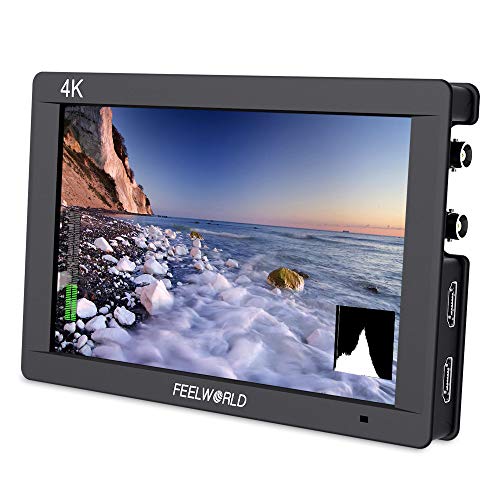
FEELWORLD
FEELWORLD FW703 7-inch 3G-SDI Monitor
SDI in and out at seven inches, which is what a director's monitor needs when the camera speaks BNC and the run is long.
- Input
- 3G-SDI and HDMI

Neway
LILLIPUT H7S 7-inch 1800 nit SDI Monitor
1800 nits with SDI and tally, which is the combination that stays readable outdoors on a set with a video village.
- Brightness
- 1800 nits
HDMI or SDI, and when the answer stops being obvious
Mirrorless bodies output HDMI, usually through a micro connector soldered to a board, and that connector is the single most fragile thing on a camera rig. Cinema bodies output SDI on a BNC connector that locks with a quarter turn and runs a hundred metres over cheap coax without a repeater. If your camera has SDI, use SDI, and buy a monitor that accepts it.
If your camera only has HDMI, the answer is not to avoid monitors, it is to clamp the cable. Every decent cage has an HDMI clamp for exactly this reason, and using it transfers a snag from the port to the cage. A monitor is a cheap purchase; a reflowed HDMI port is a bench repair and a week without the camera.
The FEELWORLD FW703 7-inch 3G-SDI Monitor and the LILLIPUT H7S 7-inch 1800 nit SDI Monitor both take SDI and HDMI, which is the sensible position for anyone who owns one of each kind of camera. The Lilliput adds 1800 nits and tally, and tally matters the moment more than one camera is running and somebody needs to know which is live.
The features worth paying for, ranked
| Feature | What it does | Worth paying for? |
|---|---|---|
| False colour | Paints each brightness range a fixed colour so skin and highlights are checked at a glance | Yes, on every monitor. This is the whole point |
| 3D LUT loading | Shows a graded preview of a log image so you judge contrast honestly | Yes, if you shoot log, which is almost everyone |
| Waveform | Absolute brightness readout across the frame, the tool colourists actually use | Yes, and learn it after false colour |
| 1600 nits or more | Readable in open shade without a hood | Yes, if you shoot outside at all |
| Focus peaking | Outlines the in-focus edges | Useful, but every camera already has it |
| Internal battery | One less NP-F cell and one less cable to snag | Yes on a gimbal, no on sticks |
| 4K input | Accepts a 4K signal, then downscales it to a 1080 panel anyway | Rarely. The panel is the limit, not the input |
| Touchscreen | Faster menus | Nice. It will not save a shot |
The one to be sceptical of is the 4K input line on a spec sheet. Almost every field monitor under $300 has a 1920 by 1080 panel, so a 4K signal is accepted and immediately scaled down. It is not a lie, it just does not do what buyers assume it does. Judge the panel resolution and the brightness, not the input.
Powering the monitor without adding a second battery system
Most field monitors take an NP-F cell on the back, which is the format the NEEWER NP-F970 Two-Battery Kit with Charger supplies for under $50 with a charger. This is the simplest possible answer and the right one at the starter tier, at the cost of carrying a second charger and a second battery type.
The moment you own a V-mount, stop doing that. A SmallRig VB99 Mini V-Mount, 99Wh with a SmallRig Foldable V-Mount Battery Plate runs the camera through a dummy battery and the monitor off a D-Tap from the same cell, so the rig has one battery, one charger and one number to watch. That is the single most worthwhile power upgrade on any rig, and it costs less than most monitors.
The alternative is a monitor with a cell built in, like the FEELWORLD P6XL 6-inch. On a gimbal build this is genuinely the best answer, because every cable between the camera and an accessory is a snag point that fights the stabiliser, and a monitor that needs no power cable removes one of only two cables in the whole rig.
How to actually use false colour
Turn it on, point the camera at a person, and adjust exposure until their skin sits in the band the monitor assigns to roughly 55 to 70 IRE. On most implementations that is pink or a light green. Ignore everything else on screen while you do this. Skin is the reference because an audience forgives a blown window and does not forgive a grey face.
Then check the top of the scale. Red or purple, depending on the scale, means clipped, and clipped means gone. A window at clipping is usually acceptable. A face or a white shirt at clipping is a reshoot. That is the entire workflow, and it takes about two seconds per setup once it is a habit.
The reason this beats a histogram is that a histogram tells you the distribution of the whole frame with no idea where those pixels are. False colour tells you that the specific thing you care about is at the specific level you want. The monitoring and exposure tools guide goes through waveform and zebras as well, for when false colour is not enough.
When you should not buy a monitor
If everything you shoot is a standard picture profile in controlled light, and you never grade, a monitor buys you very little. The rear screen shows you roughly the finished image, and roughly is enough when the image is already contrasty and the light is not changing.
If your rig lives on a gimbal at the edge of its rated payload, a monitor may cost you more than it gives. Check the numbers on the gimbal payload calculator before adding several hundred grams high up on the rig, because a stabiliser that cannot balance is a stabiliser you did not buy for any reason.
And if you have not yet solved audio, buy the microphone first. Bad exposure loses a shot. Bad sound loses the whole piece, and it is more common.
How we chose
These picks come from published panel specifications, stated brightness and input support, power requirements, and verified owner reviews describing long-term use. We did not have every one of these monitors in our hands and will not pretend otherwise. What we can do is read the specifications carefully and say which numbers change how a monitor behaves on a real rig.
The criteria in order: does it have false colour, does it load a 3D LUT, is it bright enough for where you shoot, how does it take power, and does it accept the connector your camera actually outputs. Panel resolution came last, because a 1080 panel at 5.5 inches is already beyond what the eye resolves at arm's length.
Next, from here
- Monitoring and exposure tools
False colour, waveform and zebras, and which to trust.
- Monitor recorders
When a monitor should also be recording the file.
- Wireless video transmitters
Getting the picture to somebody standing further away.
- Battery runtime calculator
What a bright panel actually costs you in cells.
- Run and gun working build
Where the monitor sits in a complete rig.
- Best camera cages
The cable clamp that keeps the HDMI port alive.
Common questions
- Do I need a field monitor if my camera has a flip-out screen?
- You need one if you shoot log, shoot outdoors, or both. A flip-out screen is fine for framing and useless for judging exposure on a flat picture profile, because a log image looks pale and washed out no matter how it is exposed. A monitor with false colour turns exposure from a judgement call into a reading. If you shoot a standard profile in controlled light and never grade, skip it.
- How many nits does a camera monitor actually need?
- Around 1000 nits covers interiors and open shade. From 1600 nits you can work outdoors without a hood in most conditions. At 2000 nits and above the panel is readable in direct sun but draws roughly double the power of a 1000 nit panel at full output. A $23 sunshade hood buys back more usable contrast in bright light than a 600 nit upgrade does, so buy the hood before the brighter monitor.
- What is a 3D LUT on a monitor and do I need it?
- A 3D LUT is a colour lookup table that transforms the flat log signal into a contrasty preview, so what you see resembles the finished grade. You need it if you shoot log and show the picture to anyone who is not you, because a client looking at raw log footage assumes the image is broken. It also helps you judge contrast honestly, which false colour alone does not do.
- Is a 7-inch monitor better than a 5-inch one?
- Only for a different job. A 5 to 5.5 inch monitor is an operator tool that mounts on the camera without disturbing balance. A 7 inch monitor is a director tool that belongs on a stand, because it is heavier, draws more power and sits on an arm far enough out to act as a lever on a handheld rig. Buy the small one for the camera and the large one for the people watching.
- Can I power a monitor from the same battery as the camera?
- Yes, and you should as soon as you own a V-mount. A V-mount plate with D-Tap outputs runs the camera through a dummy battery and the monitor from a second output on the same cell. That gives the rig one battery, one charger and one runtime number to watch. Before that, most monitors take NP-F cells, which is simple but means carrying two battery types and two chargers.
- Does a 4K input matter on a field monitor?
- Much less than the spec sheet implies. Nearly every field monitor under $300 has a 1920 by 1080 panel, so a 4K signal is accepted and then scaled down to the panel resolution. It is useful for compatibility, since some cameras will not output a downscaled signal, but it does not give you a sharper image. Judge the panel resolution and the brightness instead.
Totalling your own rig weight against your gimbal payload? The Camera Rig Build Planner is the paid version of these pages: 8 printable worksheets you fill in with your own numbers, plus the full PDF, $29.