Internal Recording vs External Recorder: Is a Recorder Still Worth It?
Short answer
On a modern body with 10-bit 4:2:2 all-intra internal recording, an external recorder buys a bigger screen and a marginal codec upgrade for several hundred dollars plus a power and rigging problem. It remains genuinely transformative on bodies with weak internal codecs, on any body that outputs RAW over HDMI, and where a client requires ProRes delivery.
The case for an external recorder was overwhelming a decade ago and is now conditional. A Atomos Ninja 5.2-inch at around $589 gives you ProRes, a bigger screen and often longer recording, and it costs a purchase, 10 to 20 W of power, a cable and a mounting problem. On a body with a good internal codec, a FEELWORLD F5 Prox 5.5-inch at $170 solves a more common failure for a quarter of the money.
What an external recorder genuinely provides
A better codec, when the camera has a weak one. Recording ProRes off the HDMI output sidesteps a long-GOP internal file entirely, and on a body whose internal codec falls apart on complex scenes that is a real image improvement rather than a technical one.
RAW capture, on bodies that output it. Several mirrorless cameras send a RAW signal over HDMI that only an external device can record, and a Atomos Ninja RAW turns that into ProRes RAW. This is a capability the camera simply does not have on its own.
A bigger, brighter screen, since the recorder is also a monitor, and often longer recording time because camera file size limits and some recording caps do not apply to the external file. Overheating limits still do, since those come from the sensor rather than the file.
What it does not provide
A better image. The sensor, lens and processing pipeline are unchanged. A recorder captures what the camera sends out of its port, so an 8-bit 4:2:0 output is recorded faithfully as 8-bit 4:2:0 in an expensive wrapper. Checking what your specific body actually outputs is the single most important step before buying, and it is the most common disappointment in the category.
A simpler rig. A recorder is a device, a cable, a power draw and a mount, and it usually pushes a rig into needing V-mount power that it did not need before. That is a real total cost beyond the purchase price.
Cheaper media. ProRes fills drives several times faster than a camera codec, and that cost recurs on every project. ProRes 422 HQ at 4K is about 396 GB per hour against 108 GB per hour for a 240 Mbps camera codec, which is roughly four times the storage forever.
The comparison
| Internal recording | External recorder | |
|---|---|---|
| Typical best codec | 10-bit 4:2:2 all-intra on modern bodies | ProRes, ProRes RAW |
| Purchase cost | None, it is in the camera | $589 to $985 |
| Extra power draw | None | 10 to 20 W continuously |
| Extra rigging | None | A mount, a cable, and a clamp |
| Storage per hour at 4K | 68 to 108 GB | 396 GB and up |
| Screen | The camera screen | A bright 5 to 7 inch monitor |
| Recording limits | Camera limits apply | Some limits bypassed, heat limits do not |
| Reliability | One device, one file | Two devices, one cable between them |
The reliability row is worth sitting with. An external recorder adds a cable to a micro HDMI port, and an HDMI disconnection stops a recording rather than degrading it. Clamping that cable at the cage is not optional on a rig with a recorder, and it is a genuine argument for internal recording where the codec allows.
The three positions
$170 to $985. A monitor with no recording, a monitor recorder for HDMI bodies, and an SDI recorder for a narrative set.

FEELWORLD
FEELWORLD F5 Prox 5.5-inch
1600 nits and 3D LUT loading in a 5.5-inch body, which is the point where a monitor stays usable outdoors without a hood.
- Brightness
- 1600 nits
- LUTs
- 3D LUT
The value pick for run and gun.
Check price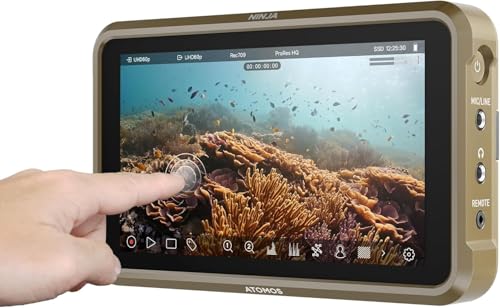
Atomos
Atomos Ninja 5.2-inch
Monitor and ProRes recorder in one, which sidesteps a camera's internal codec limits and gives an edit-friendly file straight off the card.
- Size
- 5.2 in
- Codec
- ProRes
The pick when the body records only long-GOP internally.
Check price
Blackmagic Design
Blackmagic Video Assist 7-inch 12G
12G-SDI and HDMI in, scopes on screen, and recording to fast SD or an external drive, which is the monitor a narrative set runs on because it speaks SDI.
- Inputs
- 12G-SDI + HDMI
- Size
- 7 in
Heavy and power hungry for a gimbal build.
Check priceWhen to buy the recorder
- Your camera outputs RAW over HDMI and cannot record it internally. This is the strongest case and it is a genuine new capability.
- Your camera only records long-GOP internally and your edits are fighting the files.
- A client or facility requires ProRes camera originals as a deliverable.
- You need a bright 5 to 7 inch monitor anyway, in which case the recording is close to free.
- You shoot long-form interviews and the camera has file or duration limits that the external file bypasses.
- You record to SDI on a cinema body and want scopes, recording and monitoring in one device.
Notice that four of those six are about workflow rather than image quality. That is the honest state of the category: on modern bodies, a recorder is mostly a workflow purchase, and workflow purchases are worth making when the workflow is actually hurting.
When to skip it
If your body writes 10-bit 4:2:2 all-intra internally, as several current cameras do, the codec gap is much narrower than the marketing implies. The money is better spent on a monitor, glass or lighting, all of which change the image on every shot.
If your body writes BRAW internally, skip it entirely. That is the whole point of a Blackmagic camera and adding a RAW recorder is buying a capability you already own.
If exposure judgement is not yet solved, buy a monitor instead. A $170 monitor with false colour prevents unrecoverable underexposure, which is a far more common failure than a difficult grade. A better codec makes good footage easier to grade and does nothing for footage that was two stops under.
Next, from here
- Best monitor recorders
The devices, compared.
- ProRes versus BRAW
The two RAW-adjacent workflows.
- Codecs explained
What your internal codec actually is.
- Best on-camera monitors
The cheaper, more urgent purchase.
- Storage per hour calculator
The running cost of ProRes.
- Best cinema cameras
Which bodies need help and which do not.
Common questions
- Does an external recorder improve image quality?
- It improves the file, not the image. The sensor, lens and processing are unchanged, so the recorder captures exactly what the camera outputs. On a body with a weak long-GOP internal codec, that improvement is real. On a body outputting 8-bit, an expensive recorder faithfully records 8-bit. Check what your specific camera outputs before buying anything.
- Is an external recorder still worth it on a modern camera?
- Conditionally. If your body writes 10-bit 4:2:2 all-intra internally, the codec gap is narrow and the recorder mostly buys a bigger screen for several hundred dollars plus a power and rigging problem. It remains genuinely worth it for RAW capture over HDMI, for weak internal codecs, and where a client requires ProRes camera originals.
- What does an external recorder cost to run?
- Storage, mostly. ProRes 422 HQ at 4K is about 396 GB per hour against roughly 108 GB per hour for a 240 Mbps camera codec, which is around four times the drives, offload time and archive space forever. It also draws 10 to 20 W continuously, which usually pushes a rig into needing V-mount power it did not need before.
- Can a recorder bypass my camera recording time limit?
- Often, because the external file is written by the recorder so camera file size limits and some recording caps do not apply. Overheating limits still do, since those come from the sensor and internal electronics rather than from the file. Check your body specifically: some cameras stop the HDMI output when internal recording stops, which defeats the purpose.
- Should I buy a monitor or a recorder first?
- A monitor, unless your codec is genuinely limiting you. A $170 monitor with false colour prevents unrecoverable underexposure, which is a much more common failure than a difficult grade. Move to a recorder when the edit is fighting your files, when a client requires ProRes delivery, or when your camera cannot record internally what you need.
- Do I need a recorder with a Blackmagic camera?
- No. Blackmagic bodies write BRAW internally to inexpensive media, which is the same class of workflow a RAW recorder provides on a mirrorless body. Adding one is buying a capability you already own. That internal capability is a genuine cost advantage worth counting when comparing bodies, because it removes a device, a cable and a power draw.
Totalling your own rig weight against your gimbal payload? The Camera Rig Build Planner is the paid version of these pages: 8 printable worksheets you fill in with your own numbers, plus the full PDF, $29.