Shutter Angle and Frame Rate Chart: Every Conversion
Short answer
A 180 degree shutter means an exposure time of half the frame interval, which is the frame rate doubled expressed as a fraction. At 24 fps that is 1/48 second, at 25 fps 1/50, at 30 fps 1/60 and at 60 fps 1/120. Halving the angle doubles the shutter speed, and doubling it halves the speed.
Shutter angle is a fraction of the frame interval and shutter speed is a duration, so converting between them depends on the frame rate. The table below covers every combination you are likely to need, plus the flicker-safe settings for mains lighting. Holding 180 degrees in daylight is what a PolarPro 82mm McKinnon VND, 2 to 5 Stops exists for.
The full conversion table
| Frame rate | 45 deg | 90 deg | 172.8 deg | 180 deg | 270 deg | 360 deg |
|---|---|---|---|---|---|---|
| 23.976 fps | 1/192 | 1/96 | 1/50 | 1/48 | 1/32 | 1/24 |
| 24 fps | 1/192 | 1/96 | 1/50 | 1/48 | 1/32 | 1/24 |
| 25 fps | 1/200 | 1/100 | 1/52 | 1/50 | 1/33 | 1/25 |
| 29.97 fps | 1/240 | 1/120 | 1/62 | 1/60 | 1/40 | 1/30 |
| 30 fps | 1/240 | 1/120 | 1/62 | 1/60 | 1/40 | 1/30 |
| 48 fps | 1/384 | 1/192 | 1/100 | 1/96 | 1/64 | 1/48 |
| 50 fps | 1/400 | 1/200 | 1/104 | 1/100 | 1/67 | 1/50 |
| 59.94 fps | 1/480 | 1/240 | 1/125 | 1/120 | 1/80 | 1/60 |
| 60 fps | 1/480 | 1/240 | 1/125 | 1/120 | 1/80 | 1/60 |
| 100 fps | 1/800 | 1/400 | 1/208 | 1/200 | 1/133 | 1/100 |
| 120 fps | 1/960 | 1/480 | 1/250 | 1/240 | 1/160 | 1/120 |
| 240 fps | 1/1920 | 1/960 | 1/500 | 1/480 | 1/320 | 1/240 |
The only row worth memorising is the 180 degree column, and the pattern there is simply double the frame rate. Twenty four wants 1/48, sixty wants 1/120, and everything else follows. The 172.8 degree column is a real setting on cinema cameras precisely because it lands on 1/50 at 24 fps and solves European flicker.
What each angle looks like
| Angle | Effect | Used for |
|---|---|---|
| 11 to 45 deg | Very crisp frames, staccato motion | Violence, disorientation, impact |
| 90 deg | Noticeably sharper motion | Action sequences, heightened tension |
| 172.8 deg | Effectively identical to 180 | Flicker avoidance in 50 Hz regions |
| 180 deg | The conventional cinema look | Almost everything |
| 270 deg | Softer, smeared motion | Dreams, altered states, low light |
| 360 deg | Heavy blur, doubles exposure | Very low light, deliberate dreamlike effect |
The 360 degree setting is genuinely useful rather than only stylistic. It doubles your exposure compared with 180 degrees, which is a full stop of light for free, and in a very dark interior that stop can be the difference between usable and unusable. The cost is visible motion smearing on anything that moves quickly.
Flicker-safe settings
| Mains frequency | Safe shutter speeds | At 24 fps | At 25 fps | At 30 fps |
|---|---|---|---|---|
| 50 Hz | 1/50, 1/100, 1/200 | 172.8 deg | 180 deg | 216 deg |
| 60 Hz | 1/60, 1/120, 1/240 | 144 deg | 150 deg | 180 deg |
This is the one situation where the 180 degree rule loses. Flicker is a defect that cannot be removed in the edit, and slightly different motion blur is not. In a 60 Hz region shooting 24 fps under problem lighting, use 1/60 and accept a 144 degree shutter, which is a change nobody will notice.
Why the shutter forces an ND purchase
A fixed shutter and a native ISO you do not want to leave means aperture is the only remaining exposure control, and aperture is a creative decision. In full sun at ISO 800 and 1/50, correct exposure is around f/16 to f/22, so a lens at f/2.8 is five to six stops overexposed.
The three ways out are to stop down, which removes the shallow depth of field you bought the lens for and eventually hits diffraction; to raise the shutter speed, which changes the motion rendering into something that reads as stuttery; or to add an ND filter, which changes nothing but the amount of light.
Only the third has no cost to the image. That is why a K&F Concept 82mm Variable ND, 1 to 5 Stops appears on every build list here, and why internal ND on a camera body is a much more valuable feature than camera reviews suggest.
Holding the shutter in daylight
$92 to $250. One affordable variable, and a narrow-range pair covering shade through open sun.
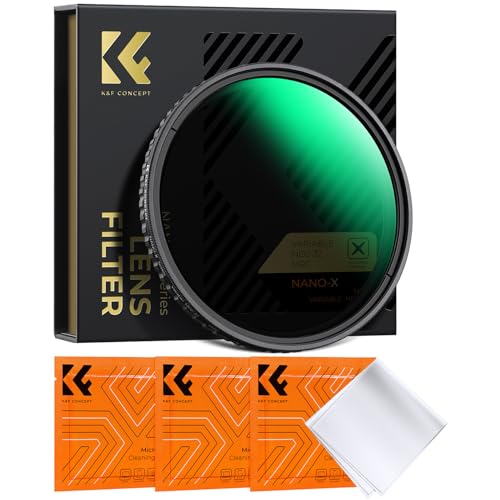
K&F CONCEPT
K&F Concept 82mm Variable ND, 1 to 5 Stops
A 1 to 5 stop range with no cross pattern, which is the safe span for a variable ND: the ugly X appears when you push a wide-range filter to its end.
- Range
- 1 to 5 stops
- Thread
- 82 mm
Use step rings rather than buying one per lens.
Check price
PolarPro
PolarPro 82mm McKinnon VND, 2 to 5 Stops
Hard stops at each end, a deliberately narrow 2 to 5 stop range and cinema-grade glass, which is the combination that keeps colour neutral.
- Range
- 2 to 5 stops
- Stops
- Hard end stops
The pick if you shoot outdoors constantly.
Check price
PolarPro
PolarPro 82mm McKinnon VND, 6 to 9 Stops
The dense half of the pair, for holding a wide aperture at 1/50 in open sun where five stops is not enough.
- Range
- 6 to 9 stops
Owning both beats one very wide filter.
Check priceSlow motion and the rule at capture rate
Shooting at 120 fps for playback at 24 means each frame is displayed for five times as long. A 180 degree shutter at 120 fps is 1/240, which produces crisp individual frames appropriate for slow motion, and that is the rule being followed at the capture frame rate rather than broken.
Applying the delivery frame rate instead would mean 1/48 at 120 fps, which is longer than the frame interval and physically impossible. The shutter can never be open longer than a frame lasts, which is what caps the angle at 360 degrees.
The practical consequence is that high frame rate work needs much more light or much higher ISO. At 120 fps with a 180 degree shutter you are at 1/240, which is more than two stops darker than 1/48, and that shortfall has to come from somewhere.
Next, from here
- Shutter angle and frame rate guide
The reasoning behind the table.
- ND and shutter angle calculator
How many stops your conditions need.
- Timecode and frame rate calculator
Drop frame and running time maths.
- ND stops and density chart
Every density and what it removes.
- Best variable ND filters
What holds 1/50 in daylight.
- Handheld shooting guide
Why a fast shutter makes shake worse.
Common questions
- What shutter speed is a 180 degree shutter?
- Half the frame interval, which works out to the frame rate doubled expressed as a fraction. At 24 fps that is 1/48 second, at 25 fps 1/50, at 30 fps 1/60, at 60 fps 1/120 and at 120 fps 1/240. Most cameras offer 1/50 rather than 1/48, and the difference is a twelfth of a stop and invisible.
- What is a 172.8 degree shutter for?
- It gives exactly 1/50 second at 24 fps, which is the flicker-safe setting under 50 Hz mains lighting. Cinema cameras offer it as a real setting because it lets you shoot 24 fps in a 50 Hz region without flicker while remaining visually identical to 180 degrees. It is a practical solution rather than a stylistic choice.
- What shutter speed stops LED flicker?
- In a 50 Hz region, 1/50, 1/100 or 1/200. In a 60 Hz region, 1/60, 1/120 or 1/240. Cheap LED and fluorescent fixtures pulse at the mains frequency, and a shutter interval that does not divide evenly into that pulse catches a different part of each cycle. Flicker is a defect and slightly different motion blur is not.
- Can the shutter angle go above 360 degrees?
- No. Three hundred and sixty degrees means the shutter is open for the entire frame interval, and it cannot be open longer than a frame lasts. That is the physical ceiling, and it is worth knowing because it caps how much exposure you can buy from the shutter: 360 degrees is exactly one stop brighter than 180.
- What shutter speed for slow motion?
- Follow the 180 degree rule at the capture frame rate, not the delivery rate. At 120 fps that means 1/240. Applying the delivery rate would require 1/48 at 120 fps, which is longer than the frame interval and impossible. The practical consequence is that high frame rate work needs considerably more light or higher ISO.
- Why does a faster shutter look wrong?
- Because it removes the motion blur that audiences have been watching in cinema for a century. At 1/48 each frame contains blur that the eye integrates into smooth motion; at 1/250 each frame is crisp and displaced from the last, which reads as stuttering. It also makes handheld shake far more visible, which is why a fast shutter is a bad accident.
Totalling your own rig weight against your gimbal payload? The Camera Rig Build Planner is the paid version of these pages: 8 printable worksheets you fill in with your own numbers, plus the full PDF, $29.