SDI vs HDMI for Video Monitoring: Which Connection Your Rig Needs
Short answer
SDI uses a locking BNC connector and runs a hundred metres over inexpensive coax without a repeater, which is why cinema bodies use it. HDMI is what mirrorless bodies output, over a fragile micro connector with a practical limit around fifteen metres. If your camera has SDI, use it; if it has HDMI, clamp the cable at the cage.
This is decided by your camera, and knowing why the standards differ tells you what to do about the one you have. SDI locks, runs far, and lives on cinema bodies like the ones a LILLIPUT H7S 7-inch 1800 nit SDI Monitor is built for. HDMI is what mirrorless cameras output, through a micro connector soldered to a board, which is why every good cage has a cable clamp and why a FEELWORLD F5 Prox 5.5-inch should never hang unclamped off one.
What each standard is for
SDI, serial digital interface, was designed for broadcast facilities. It carries uncompressed video over a single coaxial cable with a BNC connector that locks with a quarter turn, and it was specified to run long distances through a building without active equipment in between. Everything about it assumes professional infrastructure.
HDMI was designed for consumer electronics: a television, a games console, a short cable behind a cabinet. It carries video and audio and control signals, it negotiates the connection when plugged in, and its connectors were designed to be inexpensive and small rather than robust.
Neither is better in the abstract. They were designed for different environments and both do their intended job well. The friction arises because mirrorless cameras built to a consumer standard are now being used in professional environments, which is exactly the situation HDMI was not designed for.
The comparison
| SDI | HDMI | |
|---|---|---|
| Connector | BNC, locks with a quarter turn | Full size, mini or micro, friction fit |
| Practical cable length | 100 m over coax at 3G | About 15 m, less at high bandwidth |
| Cable cost | Low. Coax is cheap | Low for short, high for long or active |
| Behaviour when nudged | Nothing. It is locked | Can renegotiate or disconnect |
| Carries audio | Yes, embedded | Yes, embedded |
| Carries camera control | On some implementations | Yes, on many cameras |
| Found on | Cinema and broadcast bodies | Almost every mirrorless camera |
| Repair if damaged | A cable, or a replaceable connector | A soldered board component |
The repair row is the practical difference that costs money. A damaged BNC connector on a cable is a cable. A damaged micro HDMI port on a mirrorless body is a soldered board component, which means a bench repair and a week without the camera, and it happens because somebody caught the cable.
Living with HDMI properly
- Clamp the cable at the cage. This is what the HDMI clamp on a good cage exists for and it is the single most valuable habit in this section.
- Use a right angle adapter or a cable with a moulded right angle, so the cable exits along the body rather than sticking out.
- Leave slack, and route the slack where it cannot be caught by a hand, a strap or a doorway.
- Prefer a full size HDMI port if your camera has one, because full size connectors survive far more abuse than micro.
- Carry a spare cable. HDMI cables fail more often than any other cable in a camera kit.
- Check the connection before every take on a rig that moves, because an HDMI link that renegotiates can drop a recording on an external recorder.
That last point matters specifically with an external recorder. A momentary HDMI disconnection stops the recording rather than degrading it, so a snag during a take does not produce a glitch, it produces a missing take.
Where SDI quietly saves money
A hundred metre coax run costs very little and needs nothing in the middle. That covers a large fraction of what people buy wireless video systems for, which means an SDI camera on a set with a video village may not need a wireless link at all.
The connectors survive being handled by a crew, plugged and unplugged repeatedly, and stepped on. On a set where the same camera is reconfigured several times a day by several people, that robustness is worth real money in avoided repairs.
And SDI monitors are widely available second hand from broadcast use, which is a market with a lot of well-maintained equipment. A FEELWORLD FW703 7-inch 3G-SDI Monitor at around $200 is an inexpensive way into a director monitor if your camera speaks BNC.
Monitors, by connection
$170 to $279. Two SDI monitors for cinema bodies, and an HDMI monitor for mirrorless rigs.
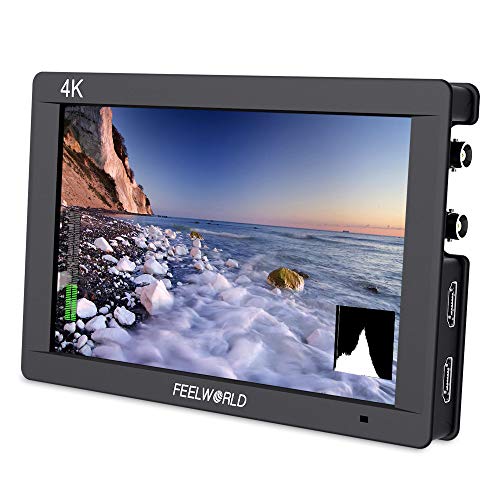
FEELWORLD
FEELWORLD FW703 7-inch 3G-SDI Monitor
SDI in and out at seven inches, which is what a director's monitor needs when the camera speaks BNC and the run is long.
- Input
- 3G-SDI and HDMI

Neway
LILLIPUT H7S 7-inch 1800 nit SDI Monitor
1800 nits with SDI and tally, which is the combination that stays readable outdoors on a set with a video village.
- Brightness
- 1800 nits

FEELWORLD
FEELWORLD F5 Prox 5.5-inch
1600 nits and 3D LUT loading in a 5.5-inch body, which is the point where a monitor stays usable outdoors without a hood.
- Brightness
- 1600 nits
- LUTs
- 3D LUT
The value pick for run and gun.
Check priceConverters, and when they are worth it
HDMI to SDI converters exist and work. They are small boxes, they need power, and they add a small amount of latency and another failure point. On a rig that needs to feed a long SDI run from a mirrorless camera, they solve the problem properly.
What they cannot fix is the fragility at the camera end. The micro HDMI port is still a micro HDMI port, still soldered to a board, and still the weakest link. A converter mounted on the cage with a very short clamped HDMI cable minimises that exposure, which is the correct way to use one.
The cost calculation is straightforward. If you need one long run for one shoot, hire or borrow. If your working pattern regularly involves a mirrorless camera feeding a video village, a converter plus coax is cheaper and more reliable than a mid-range wireless system.
The verdict
If your camera has SDI, use SDI for anything beyond the on-camera monitor. It locks, it runs far, the cable is cheap and nothing renegotiates when somebody walks past.
If your camera has HDMI, which is most cameras, the answer is not to worry about the standard but to clamp the cable. A cage with a proper clamp turns the fragile connector into a non-issue, and it costs nothing extra because you were buying the cage anyway.
If you own both kinds of camera, buy a monitor that accepts both. One device that speaks HDMI and SDI is far more useful than two devices that each speak one, and monitors with both inputs are widely available at every size.
Next, from here
- Best on-camera monitors
Both connection types, compared.
- Best camera cages
The cable clamp that saves the port.
- Wireless video transmitters
What SDI often makes unnecessary.
- Wireless video monitoring guide
When to go wireless instead.
- Best cinema cameras
Which bodies have SDI.
- Best monitor recorders
Why a dropped HDMI link stops a recording.
Common questions
- What is the difference between SDI and HDMI?
- SDI carries uncompressed video over coaxial cable with a BNC connector that locks with a quarter turn, and runs a hundred metres without active equipment. HDMI carries video, audio and control over a friction-fit connector designed for consumer electronics, with a practical limit around fifteen metres. SDI was designed for broadcast facilities and HDMI for a cable behind a television.
- Why do cinema cameras use SDI?
- Because the connector locks and cannot be knocked loose, the cable runs long distances cheaply, and nothing renegotiates when somebody brushes past. On a set where the camera is reconfigured several times a day by several people, that robustness prevents both dropped signals and the expensive repairs that a damaged soldered connector requires.
- How do I protect a micro HDMI port on my camera?
- Clamp the cable at the cage, which is what the HDMI clamp on a good cage exists for. Use a right angle connector so the cable exits along the body, leave slack routed where it cannot be caught, and carry a spare cable because HDMI cables fail more than any other cable in a kit. A damaged micro port is a soldered board repair.
- Can I convert HDMI to SDI?
- Yes, with a small powered converter box, and it works well. It adds a little latency and another failure point, and it cannot fix the fragility at the camera end, so mount it on the cage with a very short clamped HDMI cable. If your pattern regularly involves a mirrorless camera feeding a video village, a converter plus coax beats a mid-range wireless system.
- How long can an HDMI cable run for video monitoring?
- About fifteen metres for standard cables, less at high bandwidth, after which you need an active or optical cable that costs considerably more. SDI runs a hundred metres over inexpensive coax at 3G rates without anything in between, which is one of the ways an SDI camera quietly saves money that never shows up in a comparison.
- Should I buy an SDI or HDMI monitor?
- One that accepts both, if you own or expect to own more than one kind of camera. Monitors with both inputs are widely available at every size, and one device that speaks both is far more useful than two that each speak one. If you only own mirrorless bodies, an HDMI monitor is fine and generally cheaper.
Totalling your own rig weight against your gimbal payload? The Camera Rig Build Planner is the paid version of these pages: 8 printable worksheets you fill in with your own numbers, plus the full PDF, $29.