Best CFexpress Cards for Video in 2026
Short answer
The best CFexpress card for most video work is the Delkin 512GB Type B 4.0 at around $280, because 512 GB is the capacity that holds a working day without being catastrophic to lose, and Type B 4.0 sustains the write rate that high-bitrate modes need. Sony body owners need Type A instead, where the Lexar 256GB at $194 is the value option.
CFexpress is expensive and the specifications are misleading, which is a bad combination. The Delkin 512GB CFexpress Type B 4.0 at around $280 is the pick for Type B bodies because it holds a working day at high bitrates and costs meaningfully less per gigabyte than the premium alternatives. Sony cine line owners need Type A, which is a different and more expensive format, and there the Lexar 256GB CFexpress Type A Silver 4.0 at $194 is the value answer.
Type A and Type B are not interchangeable
CFexpress Type A is physically smaller, uses a single PCIe lane, and tops out at lower speeds. Type B is larger, uses two lanes, and reaches roughly double the throughput. They are different cards in different slots and no adapter bridges them.
The format is decided by your camera, not by you. Sony cine line bodies including the Sony FX3, Sony FX30 and Sony FX6 use Type A in dual slots that also accept SD cards. Canon, Nikon, Panasonic and most others use Type B. Blackmagic Pocket bodies use CFast or an external SSD, which is a different problem entirely.
Type A carries a substantial price premium per gigabyte because the market is smaller and Sony is effectively the only customer. That premium is a real cost of owning a Sony cine body and is worth counting when comparing bodies, since it shows up on every card you buy for the life of the camera.
CFexpress Type B
$280 to $700. The mainstream format, used by Canon, Nikon, Panasonic and most cinema bodies.

Delkin Devices
Delkin 512GB CFexpress Type B 4.0
512 GB of CFexpress 4.0 at the lowest sane price per gigabyte, which matters because RAW eats cards faster than any other format decision.
- Capacity
- 512 GB
- Spec
- CFexpress 4.0 Type B
The value card for most cine bodies.
Check price
Sandisk
SanDisk Extreme PRO 512GB CFexpress Type B
The card most camera makers test against, which is worth something when a body is fussy about sustained write speed.
- Capacity
- 512 GB
The pick if your camera is picky.
Check price
Lexar
Lexar 1TB CFexpress Type B Silver 4.0
A terabyte means fewer card changes and fewer chances to lose one, and on a RAW day that is a real workflow gain.
- Capacity
- 1 TB
One big card is also one big risk.
Check priceSustained write speed is the only number that matters
Cards are marketed on peak read speed, which is the least useful figure on the box. Read speed affects how fast you offload. Peak write speed is a burst figure achieved into a cache. The number that determines whether a card can record your camera's highest bitrate mode without dropping frames is sustained, or minimum, write speed, and it is often quoted in much smaller print.
A card that peaks at 1,700 MB/s and sustains 400 MB/s is a fine card. A card that peaks at 1,700 MB/s and sustains 100 MB/s will fail in a high bitrate mode after the cache fills, typically thirty to ninety seconds into a take, which is exactly when you will not notice until you review the footage.
Convert your camera bitrate to megabytes per second by dividing by 8. A 1,200 Mbps mode needs 150 MB/s sustained, and you want real headroom above that, not a card rated exactly at it. The recording bitrate calculator does this conversion and shows what card class each mode requires.
Capacity against a real shoot day
| Codec and mode | Bitrate | Per hour | Hours on 512 GB |
|---|---|---|---|
| Long-GOP 4K 10-bit | 150 Mbps | 68 GB | 7.5 hours |
| All-intra 4K 10-bit | 240 Mbps | 108 GB | 4.7 hours |
| High bitrate all-intra 4K | 600 Mbps | 270 GB | 1.9 hours |
| ProRes 422 HQ 4K | 880 Mbps | 396 GB | 1.3 hours |
| 6K BRAW 5:1 | 400 Mbps | 180 GB | 2.8 hours |
| 8K RAW | 2,600 Mbps | 1,170 GB | 0.4 hours |
This table is the argument for 512 GB over 256 GB, and against 1 TB for most people. At the codecs most people actually use, 512 GB is between two and five hours, which is a shoot day with cards to spare. A single 1 TB card holds more but concentrates the whole day into one object that can fail or be lost, and it costs more per gigabyte than two 512 GB cards on many product lines.
Type A, and a premium Type B
$194 to $400. The Sony format at two capacities, and an Angelbird Type B for anyone who wants the extra endurance rating.
Sony
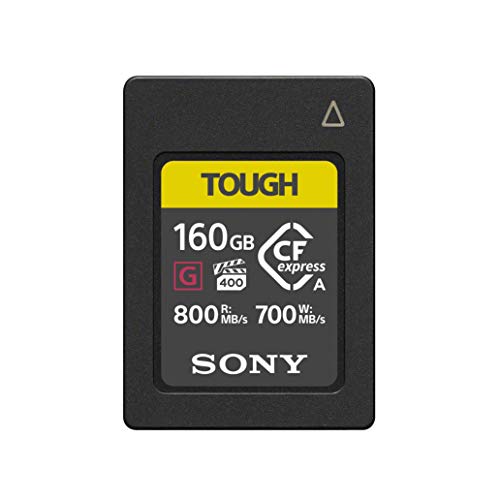
Sony CFexpress Type A 160GB
Type A is a Sony-only format and the price per gigabyte is painful, but an FX3 or FX30 needs it for the highest bitrate modes.
- Capacity
- 160 GB
- Format
- CFexpress Type A
Only for Sony bodies that require Type A.
Check price
Lexar
Lexar 256GB CFexpress Type A Silver 4.0
More capacity per dollar than the first-party Type A cards, which makes the format tolerable rather than punitive.
- Capacity
- 256 GB
Check your camera's approved list first.
Check price
Angelbird
Angelbird AV PRO SE CFexpress B v4 512GB
Specified for sustained rather than burst write, which is exactly the number that decides whether a long RAW take drops frames.
- Focus
- Sustained write
For long-take RAW recording.
Check priceHeat, throttling and why cards fail mid-take
CFexpress cards run hot, and a hot card throttles its write speed to protect itself. In a camera that already runs warm, in a hot exterior, in a cage that traps heat, a card that sustains 400 MB/s on a bench may fall below that in the field, and it fails in exactly the recording mode that needed the speed.
This is a real reason to prefer cards with a metal shell and good thermal design over the cheapest available, and it is one of the things a higher price genuinely buys. It is also a reason to give a camera a moment between long takes on a hot day rather than treating heat management as a camera-only problem.
It is worth knowing that a dropped frame from a throttling card usually appears as a recording that stops, not as a corrupted file. That is the good news. The bad news is that it stops when the moment happens, because that is when the bitrate spikes.
Readers, and the offload half of the workflow
A slow reader wastes the speed you paid for. A ProGrade CFexpress Type B Reader (USB4) at around $105 over USB4 offloads a 512 GB card in a few minutes, while a cheap USB 3.0 reader can take half an hour for the same card. On a shoot with several cards a day that difference is a real part of your evening.
Offload to two places before the card is reused. That is the entire backup discipline, and it does not need to be complicated: one copy on a working drive like the Samsung T9 1TB Portable SSD and one on a second drive or a machine, verified, before the card goes back in the camera.
Do not format in the field to make room. Buy another card instead. A card is cheaper than a lost interview, and the moment you format to continue is the moment there is exactly one copy of the day, on a drive that has not been checked.
How we chose
These picks come from published sustained and peak write specifications, stated format and capacity, manufacturer endurance ratings where given, and verified owner reviews describing behaviour in high bitrate modes and in heat. We did not have every one of these cards in our hands and will not claim otherwise.
The criteria in order: sustained write speed against realistic camera bitrates, capacity relative to a working day, price per gigabyte, and thermal behaviour. Peak read speed, which dominates the marketing, mattered only for offload time.
Next, from here
- Bitrate and card speed calculator
What your camera mode actually demands.
- Storage per hour calculator
How many cards a shoot day needs.
- Card speed reference chart
Formats, ratings and sustained figures in one table.
- CFexpress versus SD UHS-II
When the cheaper card is genuinely enough.
- Best SSDs for video
Where the footage goes after the card.
- Media workflow and backup
The offload discipline that saves projects.
Common questions
- What is the difference between CFexpress Type A and Type B?
- Type A is physically smaller, uses a single PCIe lane and reaches lower speeds. Type B is larger, uses two lanes and roughly doubles the throughput. They are different cards in different slots with no adapter between them, and your camera decides which you need. Sony cine line bodies use Type A; Canon, Nikon, Panasonic and most cinema cameras use Type B.
- What write speed do I need for 4K video?
- Divide your camera bitrate by 8 to get megabytes per second, then leave real headroom. A 240 Mbps all-intra mode needs 30 MB/s sustained, which almost any CFexpress card manages. A 1,200 Mbps mode needs 150 MB/s sustained. The number to check is sustained or minimum write speed, not the peak figure on the front of the packaging, which is a burst into cache.
- What capacity CFexpress card should I buy?
- Five hundred and twelve gigabytes for most workflows. At 240 Mbps that is nearly five hours, and at high bitrate all-intra it is close to two, which covers a shoot day. Two 512 GB cards beat one 1 TB card, because they cost less per gigabyte on most product lines and because a single card failure or loss then costs half a day rather than the whole thing.
- Why did my camera stop recording mid-take?
- Most often because the card throttled. CFexpress cards run hot, and a hot card reduces its write speed to protect itself, which drops it below what a high bitrate mode needs. It usually appears as a recording that stops rather than a corrupted file. Cards with metal shells and better thermal design resist this, and it is one of the things a higher price genuinely buys.
- Do I need an expensive card reader?
- If you shoot several cards a day, yes. A USB4 reader offloads a 512 GB card in a few minutes while a cheap USB 3.0 reader can take half an hour for the same card, and that difference is a real part of every evening. If you shoot one card occasionally, the reader is not where your money should go.
- Can I use SD cards instead of CFexpress?
- For lower bitrate modes, often yes, and a fast V90 SD card handles ordinary 4K recording on cameras with dual-format slots. What CFexpress unlocks is the highest bitrate intraframe and RAW modes that SD cannot sustain. Starting on SD and adding a CFexpress card when you find a mode you actually want is a reasonable way to spread the cost.
Totalling your own rig weight against your gimbal payload? The Camera Rig Build Planner is the paid version of these pages: 8 printable worksheets you fill in with your own numbers, plus the full PDF, $29.